You have opened your trading account, deposited money and picked a company. Now you open your broker's app, tap Buy, and the screen asks: Order type: Market or Limit? Many first-time investors freeze here, or pick one at random. This guide explains both in plain words, with examples in rupees, so your first order goes exactly as you intend.
If you have not opened an account yet, start with how to open a stock trading account in Pakistan.
First, understand the order book
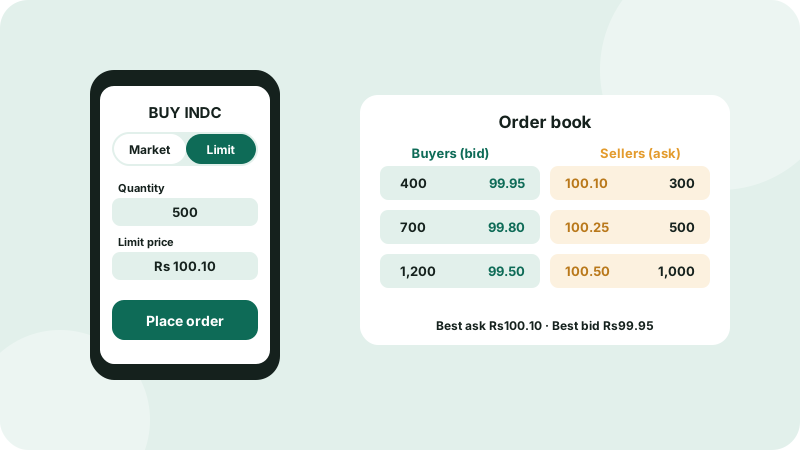
Every listed share has an order book: a live list of people who want to buy (bids) and people who want to sell (asks or offers). Your broker app usually shows the top few levels. Here is a simple example for a fictional company, Indus Cement (INDC), whose last trade was at Rs100.00:
| Buyers' quantity | Bid price (buyers) | Ask price (sellers) | Sellers' quantity |
|---|---|---|---|
| 400 | Rs99.95 | Rs100.10 | 300 |
| 700 | Rs99.80 | Rs100.25 | 500 |
| 1,200 | Rs99.50 | Rs100.50 | 1,000 |
The best ask (Rs100.10) is the cheapest price at which someone is currently willing to sell. The best bid (Rs99.95) is the highest price someone is willing to pay. The small gap between them is called the spread. Keep this table in mind for the examples below.
What is a market order?
A market order says: "Buy this many shares right now, at whatever the best available prices are." You choose the quantity, not the price. The exchange matches your order with the cheapest sellers first.
Example: Ali places a market order to buy 500 shares of INDC.
- The first 300 shares come from the cheapest seller at Rs100.10 = Rs30,030
- The next 200 shares come from the next seller at Rs100.25 = Rs20,050
Total: Rs50,080 for 500 shares, an average of about Rs100.16 per share, plus broker commission and small charges. Ali's order was filled in a second, but he paid slightly more than the Rs100.00 last price he saw on screen.
Good for: speed and certainty of getting the shares, in heavily traded companies where many buyers and sellers are active.
Risk: you do not control the price. In a quiet share with few sellers, a market order can "walk up" the order book and fill at much higher prices than you expected.
What is a limit order?
A limit order says: "Buy this many shares, but only at this price or lower." You set both the quantity and the maximum price you are willing to pay.
Example 1, a patient limit order: Sana places a limit order to buy 500 shares at Rs99.80. No seller is offering that price right now, so her order joins the buyers' side of the book at Rs99.80, behind the 700 shares already waiting there (orders at the same price are filled first come, first served). If sellers come down to Rs99.80 later in the day, her order gets filled and she saves about Rs180 compared with Ali. If the price rises instead, her order may never fill.
Example 2, a limit order that fills straight away: Bilal places a limit order to buy 500 shares at Rs100.25. Sellers are already offering at Rs100.10 and Rs100.25, so his order fills immediately, exactly like Ali's market order (300 at Rs100.10 and 200 at Rs100.25). The difference is that Bilal had a safety cap: he could never have paid more than Rs100.25.
Good for: controlling the price, buying shares that trade in low volumes, and investors who are not in a hurry.
Risk: your order may fill only partly or not at all if the price moves away from your limit.
Market vs limit at a glance
| Market order | Limit order | |
|---|---|---|
| You choose | Quantity only | Quantity and maximum price |
| Speed | Fills immediately (if sellers exist) | Fills only when the price reaches your limit |
| Price you pay | Whatever sellers are asking | Your limit price or better |
| Main risk | Paying more than expected | Not getting the shares |
| Best for | Large, heavily traded companies | Most situations, especially quiet or volatile shares |
The thin-share trap: why beginners should prefer limit orders
A small company, Mehran Textiles (fictional), last traded at Rs12.00. Its sellers' side looks like this: 100 shares at Rs12.00, 200 at Rs12.60, and 5,000 at Rs13.20.
Hamza places a market order for 1,000 shares. He gets 100 at Rs12.00, 200 at Rs12.60 and 700 at Rs13.20, an average of about Rs12.96, roughly 8% above the price he saw. Had he used a limit order at Rs12.20, he would have bought 100 shares at Rs12.00 and waited for more sellers, without overpaying.
The lesson: always check how many shares are being traded and how deep the order book is before using a market order. For large, popular companies (often called blue-chip stocks) the gap between the last price and the fill price is usually tiny.
A PSX detail worth knowing about market orders
When you place a market buy order, many broker systems check that you have enough money to pay at the day's upper price limit, not just the current price. Each share can move only a limited amount in a day before hitting its upper or lower limit (often 10%). So if you try to spend almost all your cash on a market order, it may be rejected even though the current price looks affordable. You will still pay close to the market price if it fills; this is just a safety check. Using a limit order avoids the problem because only your chosen price is checked.
Step by step: placing your first buy order
- Log in to your broker's app or website and make sure your cash balance is available.
- Search the symbol (for example, INDC). Double-check the full company name, because some symbols look similar.
- Look at the price and order book: last price, best bid, best ask and today's volume.
- Tap Buy and choose the order type: Limit (recommended for beginners) or Market.
- Enter the quantity. PSX moved to a one-share lot in 2024, so on the regular market you can buy even a single share.
- Enter your limit price (for a limit order). A sensible start is the current best ask or just below it.
- Check the order validity. In most apps, an unfilled order is cancelled at the end of the trading day unless you choose a longer option, if your broker offers one.
- Review the summary: symbol, quantity, price and estimated total including commission. A misplaced zero can turn 100 shares into 1,000.
- Confirm and enter your PIN or one-time code.
- Watch the order status: Pending/Open (waiting), Partially filled, Filled (done) or Cancelled/Rejected. You can usually modify or cancel an open order.
What happens after your order is filled
- Your broker sends a contract note showing the price, quantity, commission and charges.
- Since February 2026, PSX trades settle on T+1, meaning one working day after the trade. On settlement day the shares arrive in your CDC account and CDC sends you an SMS alert. (Learn more in Trading account vs CDC Investor Account.)
- Check your holdings on CDC Access to confirm the shares are really there.
Timing tips
- Normal market hours are 9:32am to 3:30pm from Monday to Thursday. On Friday there are two sessions, from 9:17am to 12:00pm and 2:32pm to 4:30pm. Hours change during Ramazan, so check PSX notices.
- The pre-open session (just before the market opens) lets you place orders that are matched at the opening. Orders placed then cannot be cancelled or changed until the opening match is complete.
- The first few minutes after opening can be volatile. Beginners often do better waiting until prices settle.
What about stop-loss orders?
Many apps also offer a stop-loss order, mainly for selling. You set a trigger price; if the share falls to it, the app sends a sell order automatically to limit your loss. It is useful, but in fast markets the actual sale price can be lower than your trigger. Learn the basics of buying first, then explore stop-losses as part of managing risk.
Five common beginner mistakes
- Using market orders in quiet shares and overpaying, as in the thin-share example.
- Typing errors: wrong symbol, an extra zero in quantity, or a limit price of Rs1,000 instead of Rs100.
- Chasing the price: raising your limit again and again as the price runs up. Decide your maximum price before you start.
- Forgetting open orders: an old limit order may fill later when you no longer want it. Cancel orders you no longer need.
- Spending everything in one go. Buying in parts over time reduces the risk of bad timing (see why not to invest all your money at once).
The bottom line
A market order buys now at the sellers' prices; a limit order buys only at your price or better. For your first orders, use a limit order set near the current best ask: you will usually get filled quickly, and you are protected from nasty surprises. Check every detail before you confirm, watch the order status, and make sure the shares reach your CDC account on settlement day.
This guide is for education only and is not investment advice. Company names and prices in the examples are fictional. Trading hours, price limits and broker features change from time to time; confirm with PSX notices and your broker.